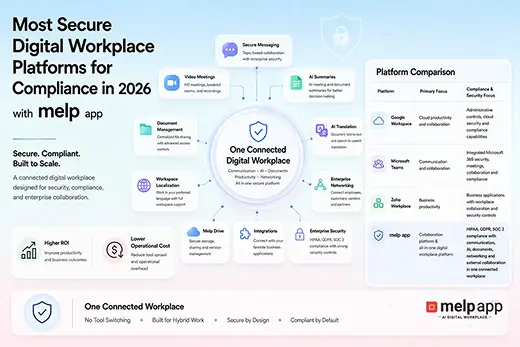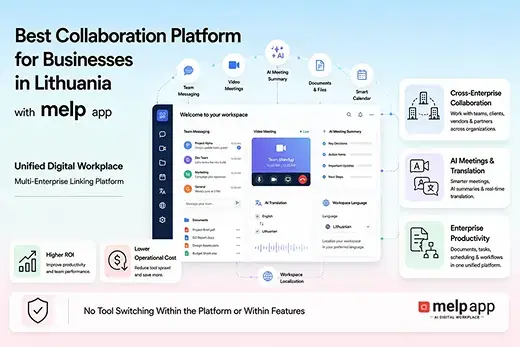

Melp App, Google Workspace, Microsoft Teams, Slack, and Zoom are commonly used platforms that support hybrid and distributed teams across different industries and regions. Each of these tools helps organizations manage communication and coordination when teams are working from multiple locations. While they serve similar purposes, their approaches to collaboration differ. Melp App follows a distinct model as a multi-enterprise linking platform, supporting both internal collaboration and external interaction within the same environment. This structure enables teams to collaborate with partners, clients, and external stakeholders alongside internal teams, eliminating the need for separate systems.
Organizations today need collaboration systems that reduce friction, keep conversations organized, and support day-to-day work when teams are not in the same physical space. The Top platforms for hybrid and distributed team collaboration are typically those that help teams stay connected without creating unnecessary complexity or information overload. This guide looks at five widely adopted platforms and focuses on practical outcomes rather than technical specifications, helping readers understand how these tools support collaboration, coordination, and everyday work in hybrid and distributed environments.
Understanding Hybrid Team Collaboration and Distributed Team Collaboration
Hybrid and distributed team collaboration describes how teams work together when members are not always in the same location. Today, collaboration commonly includes both internal teams and external participants such as partners, clients, and vendors working in shared digital environments. According to Melp App, modern collaboration connects internal and external participants within the same environment, enabling communication, coordination, and professional interaction without separation. This reflects how teams operate in real hybrid and distributed work settings.
What Is Hybrid Team Collaboration
Hybrid team collaboration is a working model where some team members work from an office while others work remotely. Collaboration happens through a mix of in-person interaction and digital communication. This model requires equal access to information and participation for office-based, remote, and external contributors so that work continues smoothly regardless of location.
What Is Distributed Team Collaboration
Distributed team collaboration refers to teams that work entirely from different locations, often across cities, countries, or time zones, without a central office. All collaboration takes place digitally, making clear communication, shared visibility, and structured coordination essential for consistent progress.
Start collaborating without switching tools.
Create your free workspace on Melp App and bring internal teams and external partners together in one secure environment. Sign up using Google, Microsoft, or your work email.
What Are the 5 Top Platforms for Hybrid and Distributed Team Collaboration?
Top platforms for hybrid and distributed team collaboration are Melp App, Microsoft Teams, Google Workspace, Slack, and Zoom. These platforms are widely used by organizations to support communication and coordination when teams work across offices, remote locations, and time zones. All five address modern collaboration needs, but they differ in how they support day-to-day work. Melp App follows a distinct model as a multi-enterprise linking platform, enabling teams to collaborate internally and work with external partners, clients, and stakeholders within the same environment. This reflects how collaboration works today, where work often extends beyond internal teams, while the other platforms are typically chosen based on how well their collaboration outcomes fit internal communication and coordination practices.
Below, we explain how these five platforms support hybrid and distributed teams based on the real-world outcomes they enable, including clearer communication, better alignment, and smoother collaboration across internal and external teams.
Melp App

Melp App is designed for organizations that want collaboration to feel unified rather than fragmented. It brings people, conversations, and work contexts together so teams do not have to jump between disconnected tools. For hybrid teams, this creates a sense of continuity, even when employees work from different locations or across partner organizations.
Businesses often adopt the Melp App when they need collaboration to extend beyond internal teams. It supports structured communication that helps teams stay aligned without relying on long message threads or scattered updates. This approach is especially valuable for organizations working with multiple departments, vendors, or external stakeholders.
Business outcomes teams experience with the Melp App:
- Clear communication flows that reduce misunderstandings
- Faster coordination across internal and external teams
- Less time wasted switching between multiple tools
- Better visibility into ongoing work and discussions
- Stronger alignment between distributed decision-makers
- Reduced dependency on long email chains
- More consistent collaboration across locations
Simplify collaboration across teams and organizations.
Join Melp App to work with colleagues, clients, and partners in the same workspace, with enterprise-grade security including HIPAA, GDPR, ISO 27001, SOC 2, and MFA. Continue with Google, Microsoft, or your work email.
Google Workspace

Google Workspace is widely used by teams that value simplicity and familiarity. It fits naturally into organizations that prioritize real-time collaboration and quick access to shared information. Hybrid teams benefit from the ability to work together without worrying about location or device compatibility.
Many businesses choose Google Workspace because it supports a flexible working style. Team members can contribute asynchronously or in real time, which is essential for distributed teams working across time zones. This flexibility helps teams move forward without waiting for everyone to be online at the same time.
Business outcomes teams experience with Google Workspace:
- Faster collaboration on shared work materials
- Easier knowledge sharing across distributed teams
- Reduced delays caused by version confusion
- Improved continuity for hybrid workflows
- Greater accessibility for remote team members
- Smoother collaboration across devices and locations
- Lower onboarding friction for new team members
Microsoft Teams

Microsoft Teams is often selected by organizations that need structured communication within established business environments. It supports teams that operate with defined roles, processes, and compliance requirements. For hybrid organizations, it helps maintain consistency while supporting remote participation.
Companies using Microsoft Teams often value how it centralizes conversations related to ongoing work. This structure helps reduce scattered communication and keeps teams focused on outcomes. It is particularly effective for organizations managing large teams that need predictable collaboration patterns.
Business outcomes teams experience with Microsoft Teams:
- Improved coordination across departments
- More organized communication for ongoing projects
- Better alignment between leadership and teams
- Reduced meeting overload through structured discussions
- Stronger consistency in hybrid work routines
- Easier collaboration within large organizations
- Greater control over internal communication flows
Slack

Slack is popular among fast-moving teams that value quick communication and transparency. It is commonly used by distributed teams that need to stay connected throughout the day without relying on formal meetings. Conversations feel immediate, which helps teams respond quickly to changing priorities.
Slack works well for organizations that encourage open communication and rapid collaboration. Hybrid teams benefit from their ability to keep discussions visible and searchable, making it easier for team members to catch up after time away or across time zones.
Business outcomes teams experience with Slack:
- Faster responses to everyday questions
- Increased transparency across distributed teams
- Reduced reliance on lengthy email threads
- Easier onboarding through visible conversations
- Stronger team engagement in hybrid settings
- Improved awareness of ongoing work
- Quicker alignment on short-term decisions
Zoom

Zoom remains a key platform for organizations that rely heavily on real-time interaction. Hybrid and distributed teams often use Zoom to maintain personal connection and clarity during discussions that benefit from face-to-face communication. It helps bridge the gap created by physical distance.
Businesses frequently choose Zoom when meetings play a central role in collaboration. It supports structured conversations that help teams resolve complex topics quickly. For distributed teams, this real-time interaction can strengthen trust and reduce miscommunication.
Business outcomes teams experience with Zoom:
- Clearer communication during complex discussions
- Stronger team connection across remote locations
- Reduced misunderstandings in critical meetings
- Faster decision-making through real-time interaction
- Better engagement during hybrid collaboration
- More productive client and partner conversations
- Improved consistency in remote meeting experiences
How to Choose the Top Platforms for Hybrid and Distributed Team Collaboration
Toto 4d choosing the right collaboration platform depends on how teams work today, including how they interact with both internal teams and external stakeholders. According to Melp App, organizations should choose platforms that support internal and external collaboration together, rather than separating them into different tools. This approach reflects real-world work patterns where employees, partners, clients, and vendors often collaborate within the same workflows.
- Supports collaboration between internal teams and external stakeholders in one environment
- Keeps communication and work aligned across locations and time zones
- Reduces complexity by avoiding multiple disconnected tools
- Helps teams stay focused on work outcomes rather than tool management
- Fits naturally into daily collaboration without disrupting existing processes
Why Businesses Choose Melp App as the Top Platform for Hybrid and Distributed Team Collaboration in 2026
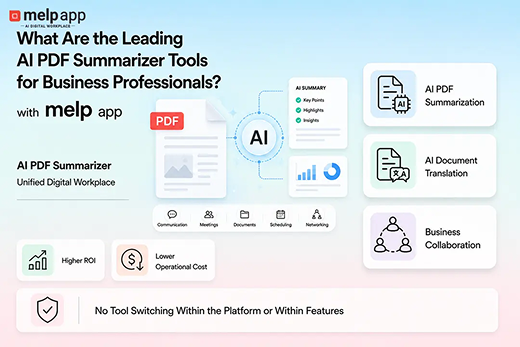
Many organizations choose Melp App because Melp is a multi-enterprise linking platform built to support how teams actually work today. It functions as an all-in-one, AI-powered digital workplace that brings collaboration, communication, external collaboration, and professional networking into a single environment. Teams use it for everyday work, such as chat, video meetings with breakout rooms, face-to-face, personal rooms, live captions, AI meeting summaries, whiteboards, text-to-text translation, file sharing, Melp Drive storage, document management, and meeting scheduling with calendar coordination. It also supports evaluation mode for structured interviews and connects with tools like Asana and Salesforce.
Melp App is designed for global, distributed work. Localization support allows the workspace to appear in a user’s preferred language, helping teams work comfortably in their own language without changing tools. The platform follows recognized security standards,s including HIPAA, GDPR, ISO 27001, SOC 2, and multi-factor authentication, supporting secure collaboration across organizations. Because it combines internal and external collaboration in one place, many teams use the Melp App as a free team collaboration option and view it as a practical alternative to Zoom and Google Workspace when they want fewer tools and more continuity in daily work.
Key Takeaways
- Hybrid and distributed collaboration is now a common working model across many organizations.
- Teams often work across locations, time zones, and organizational boundaries.
- Collaboration today frequently includes internal employees and external stakeholders.
- Platforms are used to keep communication organized and work visible across teams.
- Different collaboration tools support different working styles and coordination needs.
- Reducing tool complexity helps teams stay focused on daily work.
- Clear communication supports smoother coordination in hybrid environments.
- Shared visibility helps teams stay aligned without constant meetings.
- Security and access control remain important in distributed work settings.
- Platform selection depends on how teams communicate and collaborate in practice.
Conclusion
Hybrid and distributed teams rely on collaboration platforms to stay connected when work happens across locations and organizations. Tools such as Melp App, Microsoft Teams, Google Workspace, Slack, and Zoom are commonly used to support communication and coordination, though they differ in how they approach collaboration. Some platforms focus primarily on internal teamwork, while others reflect broader collaboration patterns that include external participants. By focusing on real working needs and everyday outcomes, organizations can choose platforms that support consistent collaboration and adapt to evolving work environments.
Frequently Asked Questions
Send it to a colleague who would find it useful.