Introduction
Most work today happens quietly inside collaboration tools. Conversations replace meetings. Files move faster than email ever allowed. Decisions get made in chat threads, not boardrooms. Teams trust these platforms because they feel familiar, quick, and convenient.
That comfort is exactly what makes them dangerous when security is weak.
Many organizations still rely on password-only access for collaboration and communication tools instead of adopting secure collaboration tools that protect business data. It feels sufficient, especially when nothing has gone wrong yet. Log in, get work done, move on. But security failures rarely announce themselves early. They show up later, when the damage is already done.
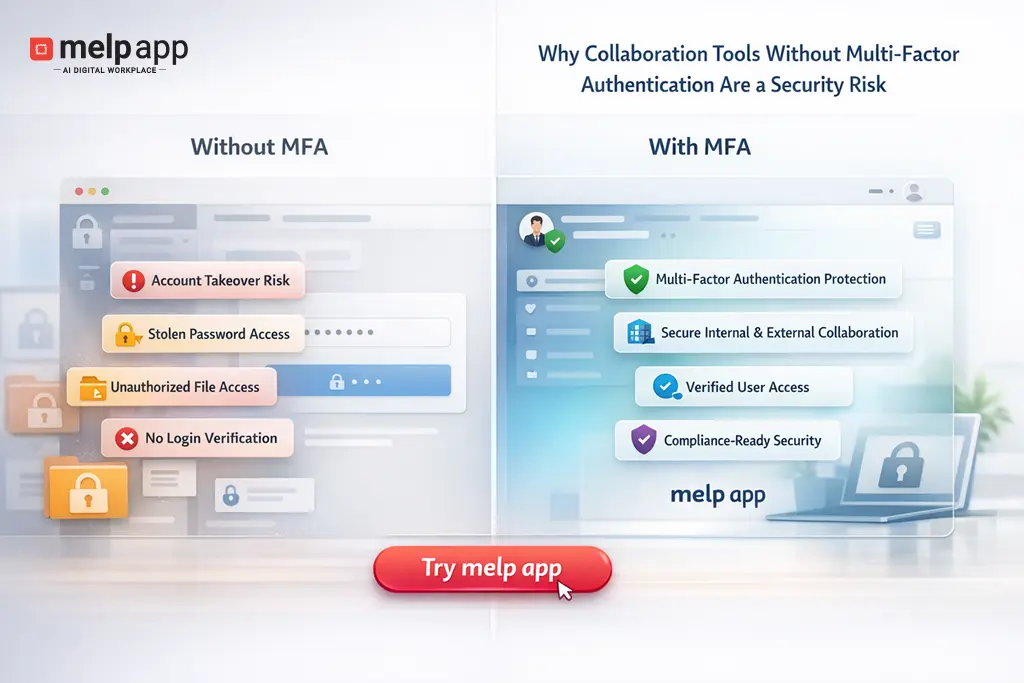
Multi-factor authentication has become a basic expectation in modern security, yet it remains optional or ignored in many workplaces. When collaboration tools lack MFA, they become open doors to sensitive conversations, internal files, customer data, and strategic plans.
This is not a theoretical problem or a concern limited to large enterprises. It affects small teams, growing startups, and established organizations alike. The risk is real, and it grows every day teams depend more on digital collaboration.
What Is Multi-Factor Authentication (MFA)?
Multi-Factor Authentication, often shortened to MFA, is a security approach that verifies a user’s identity through more than one checkpoint before granting access. Instead of trusting a password alone, MFA asks for an additional confirmation that proves the person signing in is truly authorized. This extra step matters because passwords are easy to steal, reuse, or guess, especially in today’s remote and hybrid work environments. For collaboration and communication tools that store internal conversations, shared files, and business decisions, MFA acts as a practical safeguard within modern digital workplace security environments. Platforms like Melp App, an all-in-one collaboration and communication solution, support MFA so teams can protect access to their digital workspace without slowing down everyday work.
Key points about Multi-Factor Authentication:
- Confirms identity using more than a single login credential
- Reduces the chance of unauthorized access from compromised passwords
- Adds essential protection to collaboration and communication tools
- Helps secure shared files, messages, and internal discussions
- Supports safer, more reliable access across modern work environments
What Are the Benefits of Multi-Factor Authentication in Collaboration and Communication Tools?
Multi-Factor Authentication is one of the most practical safeguards for today’s collaboration and communication tools, where teams exchange sensitive information throughout the day. Relying on passwords alone is no longer enough, especially when employees work across devices, networks, and locations. MFA adds a simple but effective verification step that helps ensure the person signing in is truly authorized. This extra protection keeps conversations private, shared files secure, and daily collaboration running smoothly. More importantly, it reduces preventable security incidents and helps organizations protect trust without adding friction to how teams work in secure communication environments for businesses.
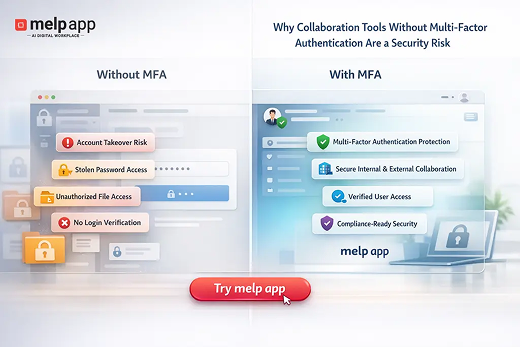
- Reduces the risk of account takeover: MFA stops unauthorized access even when passwords are stolen or guessed. Without the second verification step, attackers cannot move forward, which significantly lowers the chance of compromised accounts.
- Protects sensitive conversations and shared files: Internal chats, documents, and meeting details often hold critical business information. MFA ensures only verified users can access this content, reducing the risk of exposure or misuse.
- Strengthens security for remote and hybrid teams: As employees log in from different locations and devices, MFA provides consistent protection that does not depend on office networks or fixed environments.
- Limits damage from stolen or leaked passwords: Passwords can be exposed through phishing or data breaches. MFA prevents those credentials from being used successfully, helping contain potential security issues.
- Improves control over user access: Organizations gain better visibility and control over who can enter collaboration platforms, especially during role changes, onboarding, or employee exits.
- Supports compliance and security best practices: Many security standards and industry guidelines recommend Multi-Factor Authentication. Using MFA helps organizations align with modern expectations and reduce audit risks.
- Builds trust across collaboration and communication tools: When access is well-protected, teams feel confident sharing information. That trust strengthens collaboration with employees, partners, and clients alike.
Ready to protect your team’s collaboration?
Create your Melp App account today and secure your workspace with Multi-Factor Authentication. Sign up using your work email, personal email, or continue with Google or Microsoft, and start collaborating with confidence.
Why Collaboration Tools Are High-Value Targets
Attackers do not break into systems randomly. They go where the value is highest, and the resistance is lowest. Collaboration tools sit at the center of daily operations, which makes them especially attractive.
Inside these platforms, attackers can find internal discussions, shared documents, meeting notes, credentials pasted into chats, and even personal details about employees. One compromised account often leads to more access, not less.
Unlike traditional systems that store a single type of data, collaboration tools aggregate everything. Communication tools blend conversations with files, links, calendars, and integrations, which is why organizations increasingly evaluate enterprise messaging platforms that go beyond basic chat. That concentration of information turns a single login into a master key.
Another reason these tools are targeted is predictability. Employees log in frequently, often from multiple devices and networks. That behavior creates more opportunities for stolen credentials to work without raising suspicion.
When attackers gain access to collaboration tools, they rarely rush. They observe. They read. They learn how teams communicate and who approves what. By the time anyone notices, the attacker may already have moved laterally into other systems.
This is why collaboration tools that support Multi-Factor Authentication are essential in today’s workplace. When a single account can unlock conversations, files, and meetings, relying on passwords alone creates unnecessary risk. Melp App supports Multi-Factor Authentication as part of its all-in-one collaboration platform, helping teams protect access while keeping communication and daily work simple.
Why Password-Only Security Is No Longer Enough
Passwords were never designed to protect modern work environments. They were created for a time when systems were isolated, users were few, and access points were limited.
Today, passwords fail for simple reasons.
People reuse them. They choose predictable patterns. They store them in browsers or share them casually during busy days. Even strong passwords lose value once they are stolen through phishing or data breaches elsewhere.
The problem is not that employees are careless. It is that passwords ask humans to behave like machines. Remember dozens of unique combinations, rotate them regularly, and never make mistakes. That expectation does not match reality.
Once a password is compromised, password-only security offers no second line of defense in modern collaboration platforms used by distributed teams. The system cannot tell whether the person logging in is a legitimate employee or someone halfway across the world.
This is where Multi-Factor Authentication changes the equation. Without it, collaboration tools remain exposed, no matter how secure they appear on the surface.
What Goes Wrong When MFA Is Missing
When MFA is absent, security failures follow predictable patterns.
A team member receives a convincing email that looks like a file share notification. They click, enter their credentials, and move on with their day. Nothing seems wrong. Their password now belongs to someone else.
That attacker logs into the collaboration tool hours later. There is no extra verification step, no alert, no friction. Access is granted.
From there, damage compounds quickly. Internal messages reveal project timelines. Shared folders contain contracts. Conversations expose which vendors are trusted and which employees have approval authority.
In another common situation, a former employee’s credentials remain active. Passwords are rarely changed immediately during offboarding, especially in fast-moving teams. Without MFA, those credentials continue to work until someone remembers to revoke them.
The absence of Multi Factor Authentication turns small oversights into full-blown security incidents across digital collaboration systems used by modern teams. It removes the safety net that catches human mistakes before they become business problems.
How Multi-Factor Authentication Reduces Real-World Risk
Multi-factor authentication works because it does not rely on a single point of failure. Even if a password is compromised, access still requires something else. A temporary code, a device confirmation, or a biometric check.
This added step changes attacker behavior. Stolen credentials lose their value. Automated attacks fail. Phishing attempts hit a wall instead of an open door.
MFA also creates visibility. Login attempts from unfamiliar locations or devices become noticeable. Teams gain a chance to respond before damage spreads.
One widely cited industry study shows how effective this approach can be. According to Microsoft, more than 99.9 percent of account compromise attacks can be blocked by using Multi-Factor Authentication.
That number matters because it reflects real-world data, not theory. It shows that most attacks rely on stolen credentials alone. When MFA is present, those attacks fail.
For collaboration tools, this protection is especially important because it safeguards communication flows within real-time messaging platforms used in workplaces. It safeguards not just accounts, but the flow of communication that keeps teams running.
Business Impact of Using Insecure Communication Tools
Security incidents inside collaboration platforms rarely stay contained.
A single compromised account can disrupt operations, damage trust, and create legal exposure. Sensitive discussions may be leaked. Client information can be accessed. Internal plans might appear in the wrong hands.
The financial impact extends beyond immediate cleanup costs. Teams lose productivity as access is locked down, systems are audited, and conversations are reviewed. Leadership spends time managing fallout instead of moving the business forward.
There is also reputational damage. Clients expect their information to be handled responsibly. When breaches involve communication tools, it signals deeper issues with internal controls.
In regulated industries, the consequences escalate quickly when organizations rely on collaboration tools designed for compliance and data protection. Compliance violations, fines, and mandatory disclosures can follow, even if the breach began with a simple password compromise.
All of this stems from a security gap that is both visible and preventable.
Why Organizations Delay MFA Adoption
Despite clear benefits, many organizations hesitate to enforce Multi Factor Authentication across collaboration tools. The reasons are rarely technical.
One common concern is user resistance. Leaders worry that extra login steps will slow teams down or frustrate employees. In reality, most modern MFA methods add seconds, not minutes, to the login process.
Another reason is false confidence. If no incident has occurred yet, security feels optional. Teams mistake luck for protection and postpone changes until something forces their hand.
There is also the challenge of legacy setups, where teams continue using outdated tools instead of upgrading to secure collaboration platforms for modern workplaces. Older communication tools may not support MFA cleanly, or they require configuration effort that gets deprioritized in favor of more visible projects.
Sometimes, the delay comes from ownership gaps. Security teams assume IT will handle it. IT assumes leadership has approved it. In the meantime, nothing changes.
These delays create a window of exposure that grows wider as collaboration tools become more central to daily work.
The Hidden Security Gap Teams Often Discover Too Late
Many teams only recognize the importance of MFA after an incident exposes what was missing.
It often starts with unusual activity. Messages sent that no one remembers writing. Files accessed at odd hours. Meeting invites are appearing without context.
By the time the investigation begins, the attacker may have already harvested information or planted further access points. The realization hits hard. A simple extra verification step could have prevented the entire situation.
What makes this gap especially dangerous is its invisibility. Everything appears to function normally until it does not. There are no warning signs that password-only security is failing, just the absence of protection when it matters most.
Teams frequently assume their collaboration tools are secure by default, even when they lack multi-factor authentication security in collaboration tools. That assumption becomes costly when MFA is not part of the setup.
What Secure Collaboration Tools Should Always Include
Security should not be an afterthought or an add-on. Collaboration tools must be designed with real-world risk in mind.
At a minimum, secure platforms should support Multi-Factor Authentication across all user roles. Not just administrators, but every account that can access conversations and files.
They should offer flexible MFA options so teams can choose methods that fit their workflow without sacrificing protection. Clear login alerts and audit logs are also essential. Visibility matters as much as prevention.
Strong access controls help limit damage when something goes wrong, especially in enterprise-grade collaboration platforms with security controls. The ability to revoke sessions, enforce device checks, and manage permissions centrally makes a significant difference during incidents.
Most importantly, security features must be easy to adopt. When protection creates friction, teams look for ways around it. When it fits naturally into daily work, it becomes part of the culture.
Collaboration tools that treat security as a core function, not a premium feature, stand apart in today’s threat landscape.
How Melp App Maintains Security and Compliance for Modern Collaboration
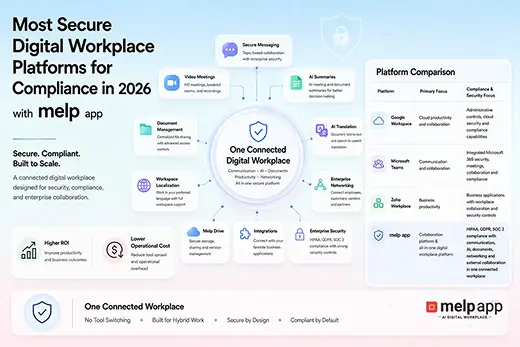
Melp App is built to support secure collaboration while meeting the compliance expectations that today’s organizations cannot ignore. As teams exchange sensitive information through chats, meetings, and shared files, Melp focuses on protecting data access, user identity, and communication flow at every stage. Security controls are designed to reduce exposure, prevent unauthorized entry, and ensure that information is handled responsibly across internal teams and external collaborations.
In addition to strong access protection through Multi Factor Authentication, Melp App aligns its security practices with globally recognized compliance standards. Support for GDPR, ISO 27001, and SOC 2 reflects a commitment to data protection, risk management, and operational integrity. These frameworks emphasize how user data is stored, accessed, monitored, and protected, helping organizations meet regulatory obligations while maintaining trust. By combining MFA with compliance-focused security practices, the Melp App enables teams to collaborate confidently, knowing their communication environment is protected, auditable, and aligned with modern security expectations.
Security and compliance outcomes supported by the Melp App:
- Protects user access through Multi-Factor Authentication
- Helps safeguard personal and organizational data under GDPR principles
- Aligns security controls with ISO 27001 standards
- Supports SOC 2 requirements for trust and data handling
- Reduces risk of unauthorized access to collaboration spaces
- Maintains secure handling of conversations, files, and meetings
- Enables secure collaboration with external teams and organizations without exposing internal data
- Builds confidence for teams, partners, and customers through compliance-led security
Key Takeaways
- Collaboration and communication tools store high-value business information, making them prime targets for unauthorized access.
- Password-only security is no longer reliable in modern work environments where credentials are frequently reused or stolen.
- Multi-Factor Authentication adds a critical verification layer that blocks most account compromise attempts.
- The absence of MFA turns small human mistakes into serious security incidents.
- Remote and hybrid work increases login risk, making MFA essential rather than optional.
- Attackers often move quietly inside collaboration tools, reading conversations and accessing files before being detected.
- Security incidents in communication tools can lead to financial loss, reputational damage, and compliance issues.
- Organizations often delay MFA due to convenience concerns, not technical limitations.
- Secure collaboration platforms should treat MFA as a standard requirement, not an extra feature.
- Tools like Melp App combine MFA with compliance-aligned security practices to protect communication without disrupting work.
Conclusion
Collaboration tools have reshaped how work gets done. They connect people, speed decisions, and hold the collective memory of organizations. That central role makes them too important to protect with passwords alone.
The absence of Multi-Factor Authentication creates a silent risk. It allows small mistakes to become major incidents. It gives attackers exactly what they want: easy access to valuable information.
Security does not require fear or complexity. It requires acknowledging how work actually happens and protecting it accordingly. MFA is no longer an advanced option or a future upgrade. It is a baseline expectation for any platform that handles communication and collaboration.
Organizations that take this seriously reduce risk without slowing down by adopting secure digital workplace platforms for modern businesses. They protect their teams, their clients, and their reputation in ways that matter.
Ignoring this reality does not save time or effort. It simply delays the moment when the cost becomes unavoidable.
Don’t Wait for a Security Incident to Take Action
Give your team a safer way to collaborate without slowing work down. Create your Melp App account today using your work email, personal email, or one-click sign-in with Google or Microsoft, and experience secure collaboration from day one.