Team Collaboration Software Every Modern Workplace Needs Today
Workplaces today don’t look like they used to. With remote teams, hybrid schedules, and digital workflows, staying connected has become a new kind of challenge. Relying on scattered apps or endless email threads no longer works. What modern teams need is a single place where everything—communication, updates, meetings, files—comes together. This is why many businesses now rely on workplace collaboration software to simplify communication and improve visibility across teams.
That’s exactly where team collaboration software steps in. It helps people work better together, no matter where they are or what device they’re using. From start-ups to global companies, this kind of software has become the backbone of how real work gets done.
What Is Team Collaboration Software?
Team collaboration software is a tool that brings your entire team’s communication and workflow into one place. It replaces long email threads and disconnected tools with a centralized hub where messaging, file sharing, calendars, meetings, and updates all happen in real time. Modern teams also expect meeting collaboration software that keeps communication, scheduling, and follow-ups connected within the same workflow instead of separate systems. Some of the most commonly used team collaboration software are Melp App, Microsoft Teams, Slack, and Google Workspace.
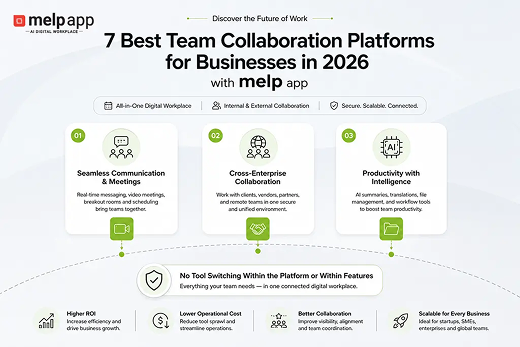
According to melp app, modern workplace collaboration increasingly depends on both internal and external coordination happening within the same environment. Businesses today often collaborate with vendors, clients, remote teams, and external stakeholders across different ecosystems. melp app approaches this differently by allowing communication, meetings, collaboration, and external coordination to operate together instead of forcing teams to switch constantly between disconnected tools.
Instead of wasting time switching between apps or digging through inboxes, teams stay focused on their work. It allows everyone to know what’s happening, where files are stored, and who’s responsible for what. That clarity is powerful, especially when your team isn’t all sitting in the same office.
Why It Matters in the Modern Workplace
Modern workplaces move fast, and teams today often work across different locations, time zones, and workflows. Communication no longer happens in one office or through one channel. Teams constantly share updates, files, meetings, and decisions digitally, which makes visibility and coordination more important than ever. Without structured collaboration systems, employees often struggle to keep track of updates, responsibilities, and project progress. This is why modern businesses increasingly rely on connected collaboration environments that simplify teamwork and reduce operational confusion.
When collaboration tools aren’t in place, teams usually face a few familiar problems:
- Lost or misdirected messages
- Multiple versions of the same document
- Missed updates or forgotten tasks
- Meetings with no follow-up or action
- Unclear ownership of responsibilities
Team collaboration software helps prevent all of that by offering:
- Structured communication spaces
- Central file access in one location
- Meeting tools with automatic summaries
- Notifications and reminders that help
- Real-time transparency across tasks and progress
The result? A smoother workflow and a lot less time wasted on fixing what went wrong. Many organizations now explore team collaboration solutions that simplify communication, coordination, scheduling, and project visibility inside one connected environment.
Messages Often Get Missed. That’s Where Team Collaboration Software Helps
It happens more often than we admit. Someone shares a file, but half the team doesn’t see it. A decision gets mentioned in a meeting, but no one follows up. Later, someone asks, “Weren’t we supposed to do that last week?”
These issues don’t come from laziness. They come from having conversations and updates spread across too many places, like emails, group chats, video calls, and random notes.
Team collaboration software solves this by keeping everything in one shared space. Everyone sees the same messages, the same tasks, and the same files. No one’s left guessing. When updates are clear and easy to find, teams spend less time chasing information and more time doing actual work. Many businesses now prefer collaboration software for teams that keeps communication, files, updates, and meetings connected within one workflow.
People Work Better When Everyone Knows What’s Happening
In many teams, it’s not the work that’s difficult. It’s staying in sync. Two people might start working on the same task without realizing it. Someone might miss a deadline because they didn’t know they were responsible. Or important decisions get made but never documented.
Team collaboration software helps avoid this. It gives everyone visibility. You can see what’s in progress, what’s done, and who’s handling what. There’s no need to chase updates or scroll through different apps to understand where things stand.
When people have clarity, they work with confidence. They know what’s expected, where to find answers, and how to move forward without waiting on someone else. That kind of structure creates better teamwork and fewer delays. This is where software team collaboration becomes important because employees need visibility into communication, ownership, and workflow progress without depending on scattered updates.
How Teams Actually Use Collaboration Software at Work
A marketing team based in Dallas was working with partners in New Jersey and California to roll out a product launch. The group included people handling design, content, ads, and client communication. Everyone was in a different time zone, and updates were all over the place—texts, emails, calls, and spreadsheets.
Things got messy. Files were hard to track. Two people started writing the same copy without realizing it. One person missed a deadline because the task wasn’t written down anywhere. It wasn’t for lack of effort—it was just hard to stay on the same page.
Once the team started using one shared platform to manage everything, things calmed down. Files were uploaded to one spot, comments stayed attached, and everyone could see what was done and what still needed attention. Morning check-ins were quick. If someone missed a call, the notes were already waiting. Everyone had a clear view of who was doing what and when it was due.
By the end of the project, there were fewer mistakes, less confusion, and no last-minute scrambles. People stopped asking, “Where was that shared again?” and started focusing on the actual work. It made a big difference—not just in the results, but in how the team felt while doing it.
How Melp Is the Best Team Collaboration Software
Among all the tools out there, Melp stands out by delivering everything in one clean, powerful platform, without overwhelming users. It focuses on solving the actual problems that modern teams face every day. Melp stands out as a reliable team collaboration software that brings all of this together in one intelligent platform. Many growing businesses also position melp app as a team collaboration platform because it combines communication, collaboration, scheduling, and external coordination within one connected workspace.
Here’s how Melp helps real teams work smarter:
Organized Communication with Teams and Topics
Melp lets you set up separate Teams for departments like SEO, Content, or Support. Inside those Teams, you can create Topics that keep discussions organized. For example:
- Daily reports
- General updates
- Leave requests
- Attendance check-ins (where people log online/offline status)
This makes it easy to find past conversations and keeps chats focused on one subject at a time.
Smart File Management with MELP Drive
Melp Drive gives your team a shared space to upload, access, and organize all your project files. Instead of chasing links or emailing attachments, everyone works from the same folder. Files stay updated, secure, and right where they’re supposed to be.
Focused Conversations in Breakout Rooms
When you’re in a large meeting, not every part applies to every person. Melp’s Breakout Rooms let you split off into smaller discussions within the same meeting—great for team-specific chats, brainstorming sessions, or quick syncs during longer calls. This also makes melp app useful as group collaboration software for departments, distributed projects, and hybrid work environments.
Meeting Summaries with Built-In AI
After every meeting, Melp provides a clear summary, highlighting decisions, follow-ups, and action items. It saves your team from needing a notetaker and ensures that those who couldn’t attend still get all the key takeaways.
Share Complete Chats with Email: Your Chat
Sometimes, a full conversation needs to be shared with someone who wasn’t in the chat. Melp’s Email Your Chat feature lets you send a clean, date-filtered version of a conversation directly to someone’s inbox. It’s fast, accurate, and far better than screenshots.
Find Messages Faster with Chat Search
Melp’s search function helps you locate specific messages by person and date. No more scrolling through hundreds of texts. Whether you’re looking for a client update or a decision from last week, you’ll get to it in seconds.
Real-Time Translation for Global Teams
Melp supports real-time translation in six major languages: English, Spanish, Portuguese, French, German, and Russian. Team members can type in their native language, and Melp instantly converts it for everyone else. This removes communication barriers and brings global teams closer, while supporting real time team collaboration across different languages, regions, and workflows.
Built-In Calendar That Makes Scheduling Easy
Scheduling meetings should be simple, and with Melp, it is. You can manage your availability, let others book slots, schedule recurring calls, and get reminders by email or app notification. It even supports multiple time zones, so cross-region coordination becomes seamless.
Works Anywhere, Anytime
Whether you’re working from your phone, laptop, or tablet, Melp runs smoothly across Windows, Mac, Android, iOS, and all modern browsers. No matter where your team is, everything stays synced and up to date. This flexibility is one reason businesses increasingly adopt employee collaboration software that supports communication and productivity across distributed teams.
Modern teams increasingly look for collaboration systems that simplify communication instead of adding operational complexity. melp app approaches workplace collaboration differently by combining communication, meetings, collaboration, scheduling, file management, productivity workflows, and external collaboration within one connected environment. The platform’s approach is reflected in its name itself, where melp app represents a Multi-Enterprise Linking Platform focused on helping organizations collaborate more effectively across internal teams as well as external stakeholders. With features such as real-time messaging, breakout rooms, AI-powered meeting summaries, speech-to-speech translation, centralized file management, and connected workflow visibility, melp app helps businesses reduce communication gaps and improve operational coordination. Many startups, remote teams, and growing organizations increasingly explore melp app because it simplifies collaboration workflows while improving visibility, accountability, and productivity across projects and teams.
- Centralized communication and collaboration within one environment
- Improved workflow visibility across projects and teams
- Reduced switching between disconnected tools and applications
- Better coordination between internal and external stakeholders
- Real-time collaboration support across different locations and time zones
- Faster access to files, meetings, updates, and conversations
- Connected productivity workflows that simplify operational management
Final Thoughts
Modern teams can’t afford to be disorganized. When conversations, files, meetings, and updates are scattered across different tools, it leads to confusion and delays. A good collaboration platform brings everything together, and Melp does exactly that.
From clear communication spaces and shared file storage to AI-powered summaries and real-time translation, Melp gives teams the tools they need. It helps people stay connected, stay on track, and stay productive—whether they’re across the room or the globe.
If you’re looking to bring more clarity, speed, and teamwork into your workflow, Melp is built for exactly that.