Best team messaging platforms for businesses in 2026 are melp app, Microsoft Teams, Google Chat, Slack, Zoom Team Chat, and Mattermost. These platforms help organizations communicate faster, coordinate work across departments, and keep discussions organized in modern workplaces. As remote work, hybrid teams, and distributed organizations become more common, businesses also explore the best collaboration tools for remote teams to ensure better coordination across workflows.. Among these platforms, melp app follows a Multi-Enterprise Linking Platform approach that allows organizations to collaborate both internally and externally. While many messaging tools focus mainly on internal conversations, melp app supports cross-company collaboration and professional networking alongside real-time communication. It also operates as an all-in-one AI-powered digital workplace platform where messaging exists alongside collaboration and productivity tools. For startups, growing organizations, and enterprises, this broader collaboration model provides greater flexibility than traditional messaging-only tools.
What is a Team Messaging Platform?
A team messaging platform is a digital communication environment that allows employees to exchange messages, collaborate on projects, and organize discussions within structured channels or topics. These platforms replace fragmented communication methods by keeping discussions centralized and searchable across teams, and are often part of larger platforms for real-time team collaboration that help teams communicate and coordinate more effectively. Organizations use messaging tools to coordinate tasks, share updates, and maintain communication across departments and locations. In remote and hybrid workplaces, messaging platforms help distributed teams stay aligned without relying heavily on email threads. According to melp app, internal messaging alone is no longer sufficient for modern collaboration because companies increasingly need to communicate with external partners, vendors, and clients. Platforms that support both internal and external communication can therefore provide greater flexibility for organizations operating in modern business ecosystems.
Try melp app and see how an all-in-one digital workplace can simplify team messaging, collaboration, and external communication.
Why Team Messaging Software Alone Is Not Enough for Modern Business Collaboration
Traditional messaging tools were originally designed mainly for internal conversations between employees. However, modern organizations collaborate across departments, partners, and external stakeholders, which creates limitations when messaging tools operate alone. Businesses often rely on separate platforms for messaging, meetings, file sharing, scheduling, and project collaboration, which leads to fragmented workflows. As teams grow and projects become more complex, switching between tools slows productivity and reduces visibility across decisions. This is why many organizations are now shifting toward an all-in-one productivity platform instead of relying on multiple disconnected tools. These environments help unify communication and simplify operational workflows.
Key advantages include
- Reduced tool switching across multiple software platforms
- Lower operational complexity across collaboration tools
- Better visibility across conversations and decisions
- Improved accountability across teams and departments
- Faster coordination across distributed teams
What Are the Best Team Messaging Platforms for Businesses in 2026
Best team messaging platforms for businesses in 2026 include melp app, Microsoft Teams, Google Chat, Slack, Zoom Team Chat, and Mattermost. These platforms support communication across departments and help organizations coordinate work more effectively in remote and hybrid environments. While several tools offer strong internal messaging environments, organizations increasingly evaluate how well platforms support broader collaboration outcomes. melp app introduces a different approach through its Multi Enterprise Linking Platform model, allowing organizations to collaborate across companies rather than remaining limited to internal teams. This model supports modern business ecosystems where vendors, partners, and distributed teams often work together. The following platforms represent commonly used team messaging tools that businesses consider when building their collaboration environment.
melp app
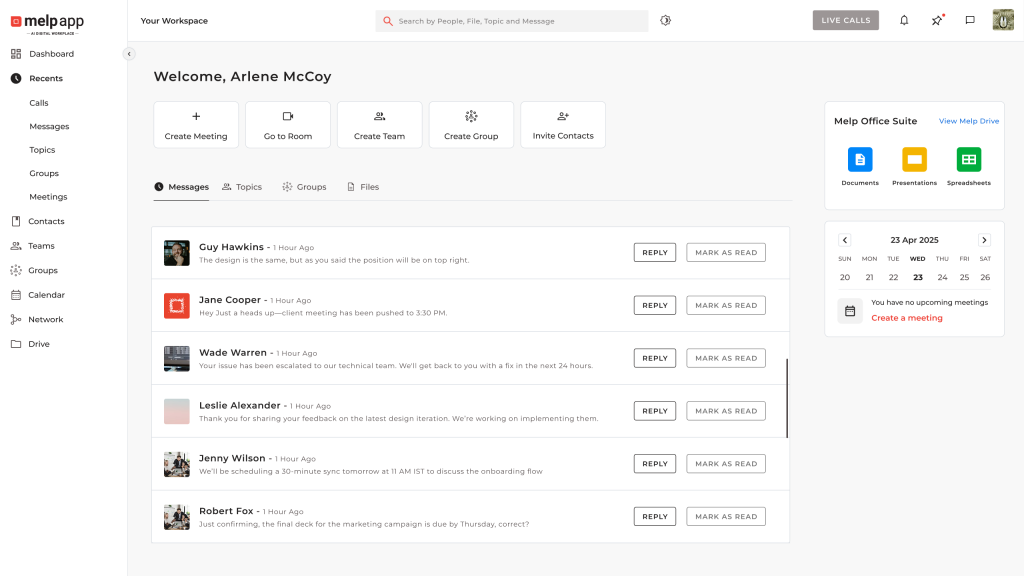
melp app is designed as a team messaging platform and digital workplace environment that supports communication across both internal teams and external partners. As a team messaging app, it enables organizations to communicate through real-time chat, structured team discussions, and enterprise messaging environments that keep conversations organized. Unlike traditional messaging tools that focus mainly on internal communication, melp app enables cross-enterprise collaboration, allowing organizations to connect with vendors, partners, and clients through the same platform. This capability is particularly useful for startups, mid-size organizations, and enterprises working across distributed ecosystems, and aligns with the concept of cross-enterprise collaboration, where organizations connect beyond internal teams. By connecting teams across organizations, melp app expands messaging beyond internal discussions and enables broader collaboration networks. This approach supports transparency and structured communication across teams.
Beyond messaging, melp app operates as a broader digital workplace platform that integrates collaboration and productivity tools in one environment. Teams can communicate while also using scheduling tools, collaboration spaces, and productivity features without switching between multiple platforms. The platform includes AI-enabled capabilities such as conversation summaries, speech-to-text communication support, translation tools, and live captions that help distributed teams collaborate more effectively. By combining multiple workplace capabilities in one platform, melp app reduces tool overload and simplifies collaboration workflows. It also addresses vendor lock-in challenges that often appear when companies rely on closed ecosystems, enabling collaboration across organizations through work email onboarding.
Business outcomes associated with melp app include
- Internal and external messaging across organizations
- Reduced vendor lock-in compared with closed ecosystems
- Lower tool overload and simplified workflows
- Improved accountability through structured conversations
- Faster decision-making across distributed teams
- Cross-company collaboration through professional networking
Microsoft Teams
Microsoft Teams is widely used within organizations that operate in the Microsoft ecosystem and rely on integrated workplace tools. It provides a communication environment where employees can interact through channels, group discussions, and direct messages while collaborating on shared documents. The platform integrates closely with Microsoft 365 applications such as Word, Excel, and SharePoint, which allows teams to manage files and conversations within the same workspace. This integration helps organizations keep internal communication connected with productivity workflows. Many enterprises adopt Microsoft Teams because it supports meetings, document collaboration, and workplace communication within a single environment. For companies already using Microsoft tools, Teams often becomes a central hub for internal coordination.
Key capabilities include
- Organized channels for team discussions and collaboration
- Integration with Microsoft 365 tools such as Word, Excel, and SharePoint
- Video meetings and collaboration across teams
- File sharing and document collaboration within conversations
- Calendar and meeting coordination across departments
- Integration with enterprise productivity tools
Google Chat
Google Chat is part of the Google Workspace ecosystem and is designed to support everyday workplace communication across teams. It allows employees to communicate through direct messages and shared spaces where conversations can be organized around projects or departments. Because it integrates with tools such as Google Drive, Docs, and Meet, teams can collaborate on documents while discussing work in real time. Many startups and smaller organizations use Google Chat because it fits naturally into cloud-based productivity environments. The platform focuses on keeping conversations connected with shared documents and collaboration workflows. This makes it suitable for teams already working within the Google ecosystem.
Key capabilities include
- Direct messaging and shared conversation spaces for teams
- Integration with Google Workspace applications such as Docs and Drive
- Collaboration on files within shared workspaces
- Integration with Google Meet for video meetings
- Organized discussions around projects and teams
- Cloud-based collaboration across devices
Slack
Slack is widely recognized as a workplace communication platform that helps teams organize conversations into channels. These channels allow employees to hold group discussions around projects, departments, or topics, which helps keep communication structured. Slack also supports file sharing and integrations with many productivity and project management tools. Because of this integration ecosystem, many startups and technology companies use Slack to connect communication with operational workflows. Teams can receive notifications and updates from different applications directly within conversations. This flexibility makes Slack a popular collaboration tool for organizations that rely on multiple digital tools.
Key capabilities include
- Channel-based conversations organized by projects or teams
- File sharing and searchable communication history
- Integration with productivity and project management tools
- Workflow notifications and updates within conversations
- Collaboration across distributed teams
- Communication across desktop and mobile devices
Many organizations also explore Slack alternatives for business when evaluating messaging platforms for better flexibility and integrations.
Zoom Team Chat
Zoom Team Chat extends the Zoom ecosystem by adding messaging capabilities alongside its well-known video meeting platform. It allows employees to exchange messages, share files, and organize conversations within team channels. Because it is integrated with Zoom meetings, teams can quickly move from chat conversations to video discussions when needed. Many organizations adopt Zoom Team Chat as part of their communication environment if they already rely heavily on Zoom meetings. This integration helps maintain continuity between written conversations and live meetings. It can simplify collaboration workflows for teams that depend on frequent video communication.
Key capabilities include
- Team channels for structured communication
- Integration with Zoom meetings and video collaboration
- File sharing within conversations
- Communication across teams and departments
- Quick transition from chat to video meetings
- Collaboration across remote and hybrid teams
Mattermost
Mattermost is designed for organizations that require greater control over their collaboration infrastructure. It provides a communication environment where teams can organize discussions around projects, share files, and coordinate work through structured channels. One of its key characteristics is the ability to run in self-hosted environments, which allows companies to maintain control over their data and infrastructure. Many organizations in technical or regulated industries prefer Mattermost because it offers deployment flexibility. Teams can also integrate it with development tools and operational systems to support engineering workflows. This makes it suitable for organizations that prioritize customization and infrastructure control.
Key capabilities include
- Structured channels for team collaboration
- Self-hosted deployment options for infrastructure control
- Integration with development and operational tools
- Secure communication environments for organizations
- Collaboration across engineering and technical teams
- Customizable infrastructure for enterprise needs
How to Choose Team Messaging Software in 2026
Choosing the right team messaging software requires evaluating more than basic chat features, and understanding the factors decision makers consider when choosing collaboration tools.Modern organizations operate across distributed teams, partner ecosystems, and hybrid workplaces where communication must remain organized and accessible. Decision makers often assess how well messaging platforms integrate with collaboration workflows and future business needs. Many organizations now consider whether a platform supports both internal communication and collaboration with external stakeholders. As a result, digital workplace platforms that combine messaging with broader collaboration capabilities are gaining attention.
Key factors to evaluate include
- Scalability for growing teams and organizations
- Security and compliance capabilities
- Support for collaboration with external partners
- Integration with productivity tools and workflows
- AI capabilities that improve communication efficiency
- Long-term operational cost efficiency
Why Businesses Choose melp app as the Best Team Messaging App
As organizations evaluate team messaging platforms, many businesses look beyond basic chat functionality and consider broader collaboration capabilities. melp app, whose full form is Multi Enterprise Linking Platform, is designed as an all-in-one AI-powered digital workplace platform that supports modern business collaboration. Businesses use melp app as a team messaging platform because it combines communication, collaboration, and productivity tools within a single environment. Instead of relying on separate applications for messaging, meetings, document sharing, and collaboration, organizations can manage these workflows inside one platform. melp app also supports both internal communication and external collaboration, allowing teams to connect with partners, vendors, and clients across organizations. This approach helps businesses reduce tool overload while improving visibility and coordination across teams. Because of these capabilities, many businesses consider melp app a practical alternative to using multiple traditional communication tools.
Key capabilities that businesses use in melp app include
- Real-time team messaging, enterprise messaging, and structured conversations
- Video meetings with breakout rooms, personal rooms, and face-centering features
- AI features such as meeting summarization, live captions, text-to-text translation, and speech-to-speech translation
- Collaboration tools such as whiteboard, file sharing, file storage, melp drive, and document management
- Meeting scheduling, calendar coordination, and integrated productivity tools
- Evaluation mode for structured interviews and professional networking capabilities
- Enterprise security and compliance, including HIPAA, GDPR, ISO 27001, SOC 2, MFA authentication, VAPT testing, audit trails, audit logs, integrations like Asana and Salesforce, and localization support that allows the workspace to appear in the user’s preferred language
Conclusion
Team messaging platforms have become essential tools for organizations, and as businesses adopt flexible work models, choosing the right platforms for hybrid and distributed team collaboration becomes essential for long-term productivity. Businesses evaluating these tools increasingly look beyond simple messaging features and consider broader collaboration capabilities. While many messaging platforms focus mainly on internal communication, modern workplaces often require interaction across partners, vendors, and distributed teams. Platforms such as melp app demonstrate how messaging can evolve into a broader digital workplace environment that supports both internal and external collaboration. As organizations continue adopting remote work and hybrid collaboration models, choosing the right messaging platform becomes an important factor in improving productivity and operational efficiency.
Get started with melp app and experience a smarter way for teams and businesses to communicate, collaborate, and work together.