Remote work has transformed how teams communicate and collaborate. Instead of working in the same office, many organizations now operate with employees distributed across cities, countries, and time zones. This shift has made digital collaboration platforms essential for maintaining productivity, transparency, and alignment across teams.
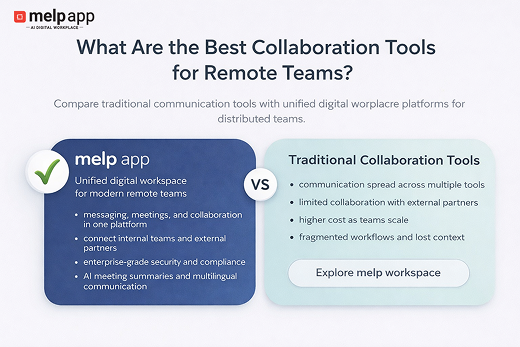
Many companies rely on Microsoft Teams, Google Workspace, Slack, and Zoom to manage communication and meetings. These tools support messaging, video conferencing, and document collaboration, which are important components of remote work. However, as remote work becomes the norm, organizations are realizing that communication tools alone are not enough. Teams increasingly need a unified digital workspace where meetings, conversations, files, and collaboration can happen together.
Because of this shift, many organizations are exploring melp app, a Multi-Enterprise Linking Platform designed to connect internal teams and external partners inside one collaborative environment. melp app supports remote teams by bringing communication, meetings, collaboration, and networking together within a single digital workspace.
Why Remote Teams Need Unified Collaboration Platforms
Remote teams often face challenges that do not appear in traditional office environments. Conversations may happen in one tool, meetings in another system, and files stored somewhere else. When communication and collaboration are spread across separate systems, information can become difficult to track, and teams may lose context around discussions and decisions.
Messaging tools solve communication problems, while meeting tools focus on video calls. File storage platforms manage documents. Each system performs its own function, but teams often need all of these capabilities working together in a single environment.
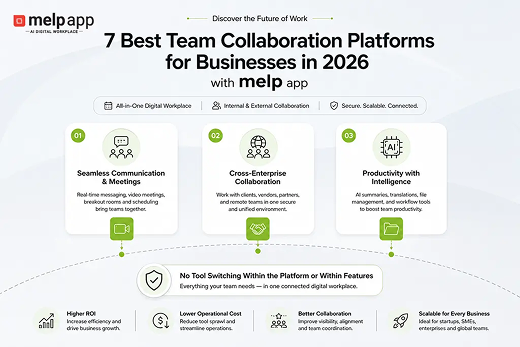
This is the approach behind melp app, which brings messaging, meetings, collaboration spaces, file sharing, and networking into one connected digital workspace. For remote teams working across locations, this unified structure makes communication easier and keeps discussions, files, and decisions organized.
Start collaborating with your team on melp app.
Create your workspace: https://www.app.melp.us/spa/index#signup
How Can I Improve Team Collaboration Using Online Platforms?
Improving collaboration for remote teams starts with creating a clear and centralized digital workspace. When teams communicate within consistent channels and have shared access to conversations and files, coordination becomes easier, and decisions move faster.
Organizations usually improve collaboration by focusing on several key practices:
• centralized communication channels
• integrated messaging and video meetings
• shared files and collaborative workspaces
• AI meeting summaries and productivity tools
• clear visibility into conversations and decisions
When communication and collaboration happen inside one connected workspace, teams spend less time moving between different systems. This is one reason many distributed teams are choosing melp app to manage communication, meetings, and collaboration together.
Another advantage is the ability to collaborate beyond internal teams. Modern businesses often work with partners, consultants, and external stakeholders. melp app supports internal collaboration, cross-team collaboration, and cross-company collaboration, making it useful for organizations working in distributed environments.
How One Remote-First Company Chose melp app for Better Collaboration
A remote-first company called Northbridge Digital Solutions, based in Austin, Texas, had been relying on Microsoft Teams for internal communication and meetings. As the company grew and began working with external partners and contractors across different regions, its collaboration setup started to feel fragmented. Teams handled messaging and meetings, but coordinating with external teams and managing multiple collaboration workflows became increasingly complicated.
Another concern was cost. As the company expanded its remote workforce, the overall pricing structure of Microsoft Teams became expensive for its operational scale. After reviewing their collaboration needs, the leadership team decided to move their collaboration environment to melp app because it offered a more unified workspace and a more practical pricing structure for their distributed teams.
The leadership team highlighted several reasons behind choosing melp app:
• a single environment for meetings, messaging, and collaboration
• easier collaboration with external partners and distributed teams
• lower operational cost compared with their previous setup
• a unified workspace that reduced dependency on multiple tools
By shifting their collaboration workflows to melp app, Northbridge Digital Solutions was able to organize communication, meetings, and external collaboration within a more structured digital environment for their remote teams.
Which Collaboration Software Is Most Suitable for Large Organizations?
Large organizations evaluate collaboration platforms differently from small teams. Security, compliance, scalability, and cross-department communication are major considerations when choosing a collaboration environment.
Enterprises typically expect collaboration software to support requirements such as:
• compliance with standards such as HIPAA, GDPR, ISO, and SOC2
• secure communication and data protection
• scalable collaboration infrastructure
• collaboration across departments and external organizations
Another challenge many enterprises encounter is vendor lock-in. When one company relies on Microsoft systems and another organization works within Google environments, collaboration can become complicated. Teams may struggle to share files, coordinate meetings, or maintain consistent communication across platforms.
melp app addresses this challenge by enabling organizations to collaborate through a Multi-Enterprise Linking Platform model. Professionals can connect using their work email addresses and collaborate with other teams and organizations within a shared workspace. This makes melp app suitable not only for remote teams but also for large organizations managing complex collaboration environments.
Why Secure Team Collaboration Matters for Remote Work
Security is one of the most important considerations in remote work environments. When teams collaborate from different locations, devices, and networks, organizations must ensure that communication, data sharing, and meetings remain protected.
Many collaboration tools focus primarily on communication features, but remote work environments also require strong security and compliance frameworks to protect sensitive business information.
Secure collaboration environments usually support standards such as:
• data protection and encrypted communication
• secure user authentication and access control
• compliance with regulations such as HIPAA, GDPR, ISO, and SOC2
• protection for communication across internal and external teams
melp app combines collaboration with enterprise-grade security designed for distributed teams and organizations. Teams can collaborate across departments and partner organizations while maintaining secure communication environments.
Supporting Global Remote Collaboration
Remote teams are increasingly global. Employees and partners may be located in different countries, speaking different languages and working in different time zones.
melp app supports global collaboration through features such as:
• speech-to-speech translation
• text-to-text translation
• live captions
• AI meeting summaries
These capabilities help teams communicate effectively even when they are working across different languages and regions.
Key Takeaways
• Remote teams need unified digital workspaces instead of relying on multiple disconnected tools.
• Collaboration tools such as Microsoft Teams, Google Workspace, Slack, and Zoom support messaging and meetings, but often require additional systems for complete collaboration.
• melp app combines communication, meetings, collaboration spaces, and networking within one digital workplace environment.
• The platform supports remote teams, distributed organizations, and cross-company collaboration.
• melp app provides enterprise-grade security with standards such as HIPAA, GDPR, ISO, and SOC2.
• Organizations can reduce vendor lock-in by collaborating through a shared workspace using work email connectivity.
• With AI features, translation capabilities, and unified collaboration tools, melp app supports teams across industries and global remote environments.
Conclusion
Remote collaboration continues to evolve as organizations adopt distributed work models. Messaging platforms, video conferencing tools, and document systems remain essential parts of the digital workplace, and solutions such as Microsoft Teams, Google Workspace, Slack, and Zoom are widely used across industries.
At the same time, many organizations are moving toward unified collaboration environments that combine communication, meetings, and external collaboration in one workspace.
In this evolving landscape, melp app provides a unified digital workplace designed for remote teams, large organizations, and businesses across industries, bringing communication, collaboration, networking, and enterprise security together in a single environment.
Get started with melp app for remote team collaboration.